Field Grouping
In forms, you can group fields by some common characteristics, specifically by combining them into sections.
To create sections, add:
<sections mode="widgets">
  <section name="general" caption="<?php echo __('General');?>"/>
  <section name="settings" caption="<?php echo __('Settings');?>"/>
</sections>
Sections can work in 2 modes (mode):
- widgets - As widgets:
 -
- tabs - As tabs:
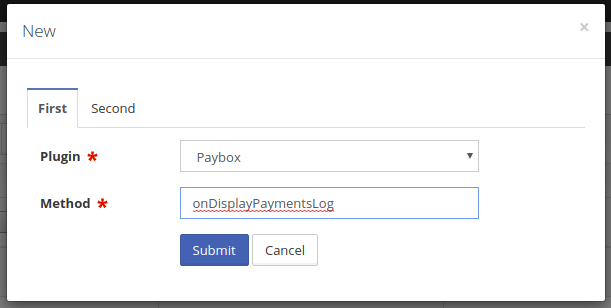
To divide fields into sections, you need to add the sections element and set the section property for the needed fields:
<field type="text"
       clicable="true"
       name="caption"
       caption="<?php echo __('Dealership Name')?>"
       filter="text"
       sorting="yes"
       required="true"
       section="general" />

<field type="file"
       name="logo"
       caption="<?php echo __('Logo')?>"
       fileName="__ID__.__EXT__"
       isnull="true"
       uploadDirPath="<?php echo Core::getInstance()->config['paths']['dealers_logo']; ?>"
       httpPath="<?php echo Core::getInstance()->config['http_paths']['dealers_logo']; ?>"
       section="general" />

<field type="text"
       name="website"
       caption="<?php echo __('Website');?>"
       filter="text"
       section="general" />

<field type="text"
       name="phone"
       caption="<?php echo __('Sales Phone')?>"
       width="15%"
       required="true"
       section="general" />

<field type="sql"
       query="import_resources.caption"
       name="import_provider"
       caption="<?php echo __('Import Provider')?>"
       width="10%"
       section="settings" />

<field type="foreignKey"
       name="website_provider"
       caption="<?php echo __('Website Provider'); ?>"
       foreignTable="website_providers"
       foreignKeyField="ident"
       foreignValueField="caption"
       allowEmpty="true"
       isnull="true"
       section="settings" />

<field type="checkbox"
       name="is_script_works"
       caption="<?php echo __('Is Script Works')?>"
       isnull="true"
       filter="yes"
       width="10%"
       section="settings" />

<field type="text"
       name="email"
       caption="<?php echo __('E-mail')?>"
       filter="text"
       sorting="true"
       hide="true"
       required="true"
       section="general" />

<field type="text"
       name="contact_email"
       caption="<?php echo __('Sales Email')?>"
       section="general"/>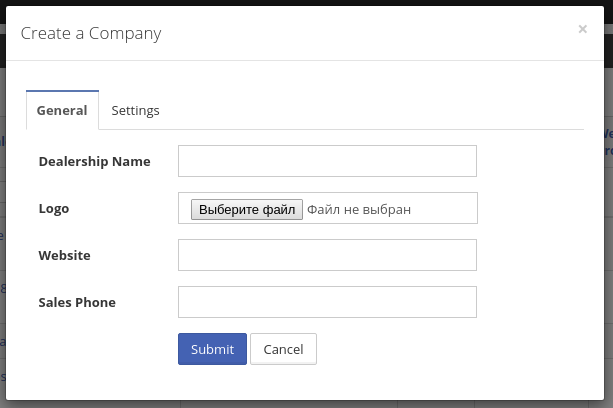
- In
tabsmode, all fields without sections are automatically added to the first section.
If you need to disable sections for specific actions, you can either remove them by reference from the DGS model or set false for the sections key in the Store::EVENT_ON_FETCH_FORM event.
When you use sections and don't set the
sectionproperty for some fields, they will be added to the first section by default.
In widgets mode, you can specify the number of columns for sections by adding the columns attribute to the sections element:
<sections mode="widgets" columns="2">
  <section name="general" caption="<?php echo __('General');?>"/>
  <section name="settings" caption="<?php echo __('Settings');?>"/>
</sections>
Class Schema Form
In a ClassSchema, sections are declared from sections() and each field is assigned to one via section(). The output hydrates the same 'sections' model section the XML loader produces, so all rendering modes (tabs, widgets, wizard) and the "first section catches unassigned fields" rule apply identically.
protected function sections(ISectionsBuilder $sections): ISectionsBuilder
{
    $sections->mode('widgets')->columns(2);

    $sections->add('general')->caption(__('General'));
    $sections->add('settings')->caption(__('Settings'));

    return $sections;
}

protected function fields(IFieldsBuilder $fields): IFieldsBuilder
{
    $fields->add('caption')
        ->type(TextField::class)
        ->caption(__('Dealership Name'))
        ->filter('text')
        ->sorting()
        ->required()
        ->section('general');

    $fields->add('phone')
        ->type(TextField::class)
        ->caption(__('Sales Phone'))
        ->width('15%')
        ->required()
        ->section('general');

    $fields->add('website_provider')
        ->type(ForeignKeyField::class)
        ->caption(__('Website Provider'))
        ->foreignTable('website_providers')
        ->foreignKeyField('ident')
        ->foreignValueField('caption')
        ->isnull()
        ->section('settings');

    return $fields;
}
See DGS Class Schema for the full section-method contract.
Section Disclaimer
A section can carry descriptive text, rendered as an info alert between its caption and its first field. Use it for what the fields mean as a group — how they combine, what a word in the captions refers to. A note about one field belongs on that field, as its disclaimer, which renders under the input instead.
<sections mode="widgets" columns="2">
  <section name="general" caption="<?php echo __('General');?>"/>
  <section name="applies_to"
           caption="<?php echo __('Applies To');?>"
           disclaimer="<?php echo __('A student qualifies by matching any one of these, not all of them.');?>"/>
</sections>
$sections->add('applies_to')
->caption(__('Applies To'))
->disclaimer(__('A student qualifies by matching any one of these, not all of them.'));The text is rendered as HTML, so it can carry a link or emphasis. It shows in all three modes — widgets, tabs and wizard.