Permissions
For proper functioning of permissions, you need a system plugin, for example Jimbo.
Permission Sections
Sections or permission sections are an abstraction used for grouping logic tied to a section that has three access gradations: Read, Write, Execute.
A section should only have an identifier, and using this identifier, you can check whether a user has access to the section. For example, you can create a users section and check for access to the users section in all places related to users.
All plugins have a method hasUserPermissionToSection(string $sectionName, ?DefaultUser $user = null): bool. If the method returns true, then the user has access to this section.
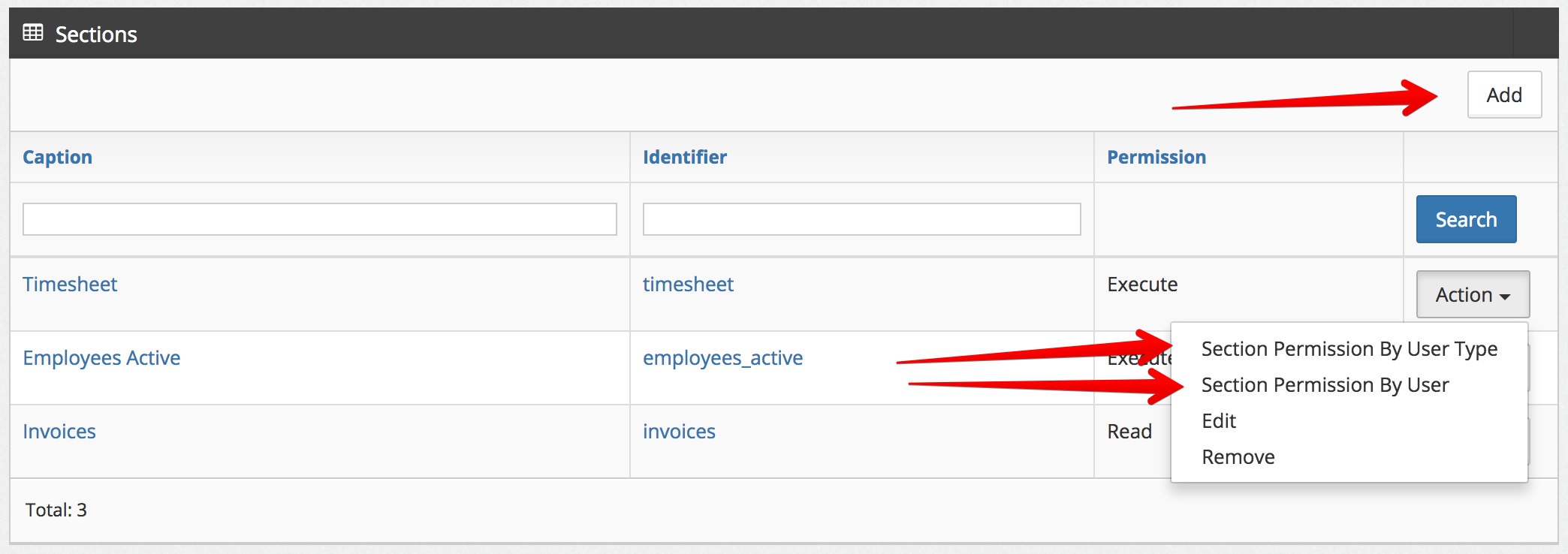
You can create a permission section via the link: /festi/festi_sections/Jimbo/ or directly in the database, in the festi_sections table. You can distribute permissions for different types of users or specific users in the same section or in tables: festi_sections_user_permission, festi_sections_user_types_permission
Actions
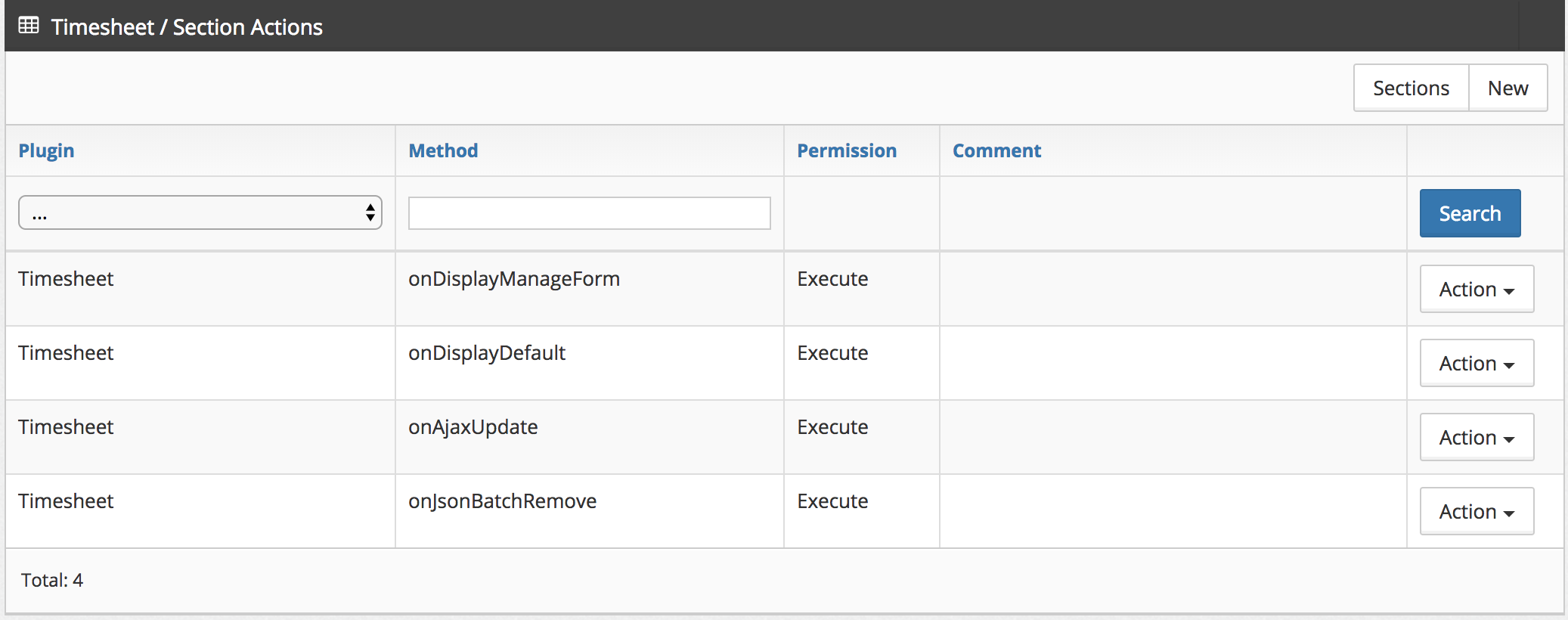
A permission section has actions - these are methods in plugins. For example, we can define a list of methods that a user can call during work in a section. If the user does not have access to the action, then when calling the method, a PermissionException will be thrown.
Actions can be described by navigating from the Sections page to a specific section or through the festi_section_actions database table.
Permission Section in DGS
To control access to DGS, you can use the permission attribute in the table which specifies the section identifier.
<table charset="UTF-8"
       name="users"
       primaryKey="id"
       defaultOrderField="id"
       defaultOrderDirection="ASC"
       rowsForPage="20"
       permission="employees_active">
       ...
</table>
Working with fields in DGS
You can define who can work with a particular field in DGS.
<field    type="price"
          name="salary"
          isnull="true"
          hide="true"
          permission="employees_offer" />
<action type="csv"
caption="<?php echo __('Export')?>"
view="top"
permission="employees_export" /> Displaying menu items
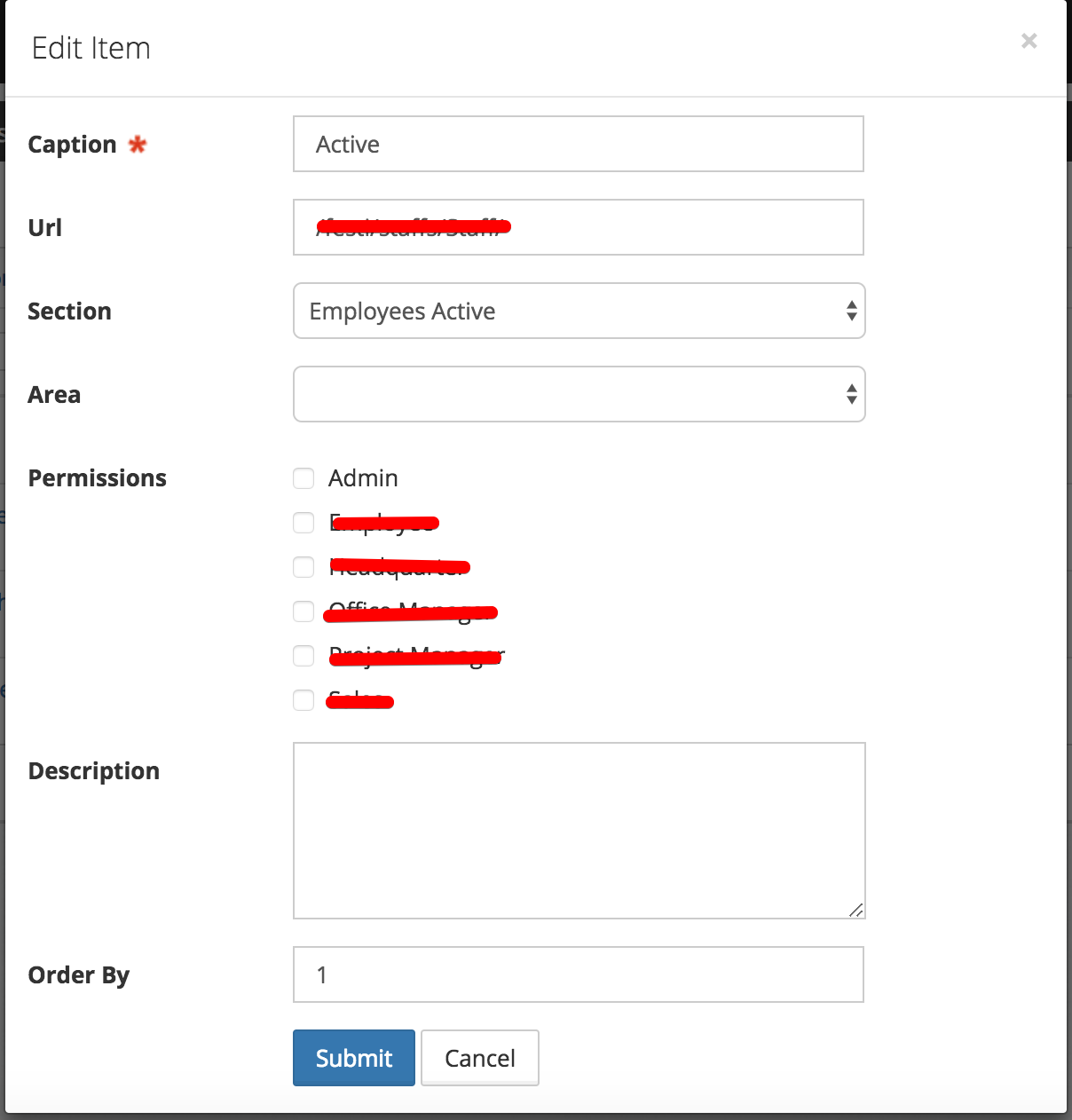
In menu management, there is a Section column. If it is specified, access will be determined not by group permissions, but by access permissions to the section.
Using sections instead of specific user group checks
When logic is restricted to a certain group of users, there is a high probability that this logic will be needed by other user groups later. To avoid constantly writing conditions like:
if (App::isAdmin()) {
    $filters = &$store->getModel()->getFilters();

    unset($filters['id_user']);
}

if (App::isAdmin() || App::isManager() || App::Mentor()) {
  ...
}
It's better to use permission sections:
$hasFullPermission = $this->core->getSystemPlugin()->hasUserPermissionToSection('full_manage_users');

if ($hasFullPermission) {
    $filters = &$store->getModel()->getSearch();
    $filters = [];
}
Permission Section Design Rule
Create one permission section per permission check. Every permission
attribute in a DGS schema and every hasUserPermissionToSection call in
PHP should map to exactly one permission section that grants exactly one
thing.
If you cannot describe a permission section in one sentence without using the words "and" or "or", split it into separate permission sections.
grades_export       — "User may export grades to CSV"              ✓
grades_manage_all   — "User may view all students' grades"         ✓
grades_teacher      — "Teacher can view, edit, and export grades"  ✗ split it
Tiered Access: Own Records vs All Records
A common requirement is that one role sees only their own records while another sees all records. The correct approach is two independent, flat permission sections — one per access level.
Define two permission sections:
| Permission section | Meaning |
|---|---|
grades_view |
User may access the Grades page |
grades_manage_all |
User may see every student's grades |
Assign both permission sections to roles that need full access. Assign
only grades_view to roles that should see their own records only.
Guard the DGS at the table level with the base permission section:
<table name="grades" primaryKey="id" permission="grades_view">Apply the scope filter in the code base on the extended permission section:
$store = $this->createStoreInstance('grades');

$systemPlugin = $this->core->getSystemPlugin();
$hasFullAccess = $systemPlugin->hasUserPermissionToSection('grades_manage_all');

if (!$hasFullAccess) {
    $search = &$store->getModel()->getSearch();
    $search['id_user'] = $this->core->user->getID();
}
Guard manager-only fields and actions with the extended permission section:
<action type="remove" caption="Delete" permission="grades_manage_all" />Each permission section has one purpose. grades_manage_all does not
imply grades_view — they are independent. Adding a third access level
later (e.g. district-wide view) requires only a new flat permission
section and a new if branch.
The $search['id_user'] filter above only scopes list views. Direct
single-record access — edit, remove, download, and similar actions that
load a row by primary key — is not covered by it: a user who can see
only their own rows in a list could still edit or remove another user's
row by guessing its ID, unless the Store enforces real per-row
ownership. See core\store\event\IRowPermissionListener in
DGS Events for that mechanism.
Parent Section
The parent_section field links a child permission to a parent
permission by ident. It solves the problem of dependent permissions
that only make sense when the user already has access to the parent
feature.
For example, a journal_by_you filter permission depends on
common_journal — there is no point having a data filter if the user
cannot reach the page. Setting parent_section = 'common_journal'
on journal_by_you makes this dependency explicit.
What it does: when an admin grants a child permission to a user type, the system automatically grants the parent permission as well. The resolution is recursive — if permission A depends on B which depends on C, granting A will also grant B and C. This eliminates a common misconfiguration where a filter permission is enabled but the page-access permission is forgotten.
Grant Section
The grant_section field references another permission by ident and
controls who is allowed to manage (grant/revoke) this permission in
the ACL management UI. It solves the privilege escalation problem —
without it, any administrator with ACL access could grant themselves
or others permissions they should not have.
If grant_section is empty, any user with access to the ACL page can
modify the permission. If it is set, only users who themselves hold the
referenced permission can see and modify it.
For example, setting grant_section = 'system_admin_access' on all
system_* permissions means only system administrators can grant or
revoke system-level access — a school administrator cannot escalate
their own privileges.
How it works:
- Filtering: the ACL page hides sections whose
grant_sectionthe current user does not have — they are invisible in the UI. - Validation: when saving permission changes, the system verifies
that the current user holds the
grant_sectionfor every modified section. If not, aSystemExceptionis thrown.