Fields
All columns and fields in DGS are described in the fields section.
You can create your field by inheriting from the AbstractField class.
System fields are located in src/store/field/.
Foreign Key Field
This field describes the relationship of a column with another table. If you are using DGS to work with a database table, make sure that you have set up a Foreign Key at the database level as well.
<field type="foreignKey"
       name="id_city"
       caption="City"
       width="15%"
       foreignTable="cities"
       foreignKeyField="id"
       foreignValueField="caption"
       join="true" />
If you need the foreignKey to reference a table that is already involved in the query,
you should use the alias attribute:
 <field type="foreignKey"
        name="id_parent"
        caption="<?php echo __l('Section')?>"
        foreignTable="settings"
        alias="parent_settings"
        foreignKeyField="id"
        foreignValueField="caption"
        isnull="true"
        allowEmpty="true"
        width="20%" />
Attributes:
foreignTable- the name of the table to which the foreign key refers.foreignKeyField- the name of the column in theforeignTableto which the foreign key refers.foreignValueField- the name of the column in theforeignTablewhose value will be used for display and search.foreignOrderBy- sorting of values.foreignLimit- limit on the number of loaded values.unique- load only unique values.autocomplete- logic for dynamically loading values, see the description of theautocompleteattribute.showSearchInput- whether to show search for autocomplete (default istrue).joinType- specify join type for the tableforeignTable, default isLEFT. (Example:joinType="INNER").extendJoin- logic for additional join tablewhere- condition added to the outerWHEREclause to filter the displayed rows.joinOn- condition added to the foreignJOIN ... ON (...)clause to scope which foreign row is matched (e.g. pick a row by tenant/workspace).
<field type="foreignKey"
       name="school_id"
       foreignTable="school"
       foreignKeyField="id"
       foreignValueField="name"
       sorting="true"
       filter="text"
       caption="<?php echo __l('School'); ?>"
       required="true"
       width="30%"
       allowEmpty="true"
       autocomplete="true"
       autocompleteLimit="10" />
Example when we need to load a composite value:
<field type="foreignKey"
       name="id_param"
       caption="<?php echo __('Setting')?>"
       sorting="true"
       foreignTable="settings"
       foreignKeyField="id"
       foreignValueField="CONCAT(settings.caption, ' | ', settings.id)"
       width="20%"/>
If you need to add conditions to filter values in the foreign key:
$idParamField = &$store->getModel()->getFieldByName('id_param');

$search = [
    'value' => 12
];

$idParamField->set('search', $search);
Overriding the Value Loading Logic for Foreign Key
You can completely override the logic for loading values for foreignKey or add parameters to the main logic:
- DGS must have a plugin.
<table charset="UTF-8" name="projects" primaryKey="id" defaultOrderField="id" defaultOrderDirection="DESC" plugin="Games" rowsForPage="50"> - Implement the
IStoreProxyForeignKeyValuesListenerinterface and override the method in the pluginonPrepareStoreForeignKeyFieldValues:public function onPrepareStoreForeignKeyFieldValues( Store &$store, AbstractField &$field, array &$info ): void { if ($field->getName() != "FIELD_NAME") { return; } $parentValues = $store->getParentValues(); $info['where'][] = 'form = '.$this->core->db->quote( $parentValues['ident'] ); return true; }
If you want to completely override the logic, you need to override the values key in $info:
public function onPrepareStoreForeignKeyFieldValues(Store &$store, ForeignKeyField &$field, array &$info): void
{
    $info['values'] = [
        1 => 'Test',
        2 => 'Test 2'
    ];
}
Usage extendJoin
This attribute is used to add additional joins to the foreignTable table.
after_schools_applications (id, id_school, id_user);

after_schools_applications_programs (id, id_application, id_school, id_session, id_program);

schools_sessions (id, id_school, caption, id_study_period);

schools_study_periods (id, id_school, caption);
<?php
$idSchool = $store->getSchool()->getID();
?>
<?xml version="1.0" encoding="UTF-8"?>
<table charset="UTF-8"
       name="after_schools_applications"
       primaryKey="id"
       defaultOrderField="id"
       defaultOrderDirection="DESC"
       rowsForPage="20"
       join="
       LEFT JOIN after_schools_applications_programs ON (
            after_schools_applications.id = after_schools_applications_programs.id_application
       )">

    <fields>
        // ...

        <field type="foreignKey"
               name="id_school_chapter"
               foreignTable="schools"
               foreignKeyField="id"
               foreignValueField="name"
               foreignLimit="20"
               required="true"
               width="10%"
               filter="text"
               sorting="true"
               allowEmpty="true"
               caption="<?php echo __('School'); ?>"
               valuesWhere="id_parent = <?php echo $idSchool; ?>"/>

        <field type="foreignKey"
               store="after_schools_applications_programs"
               name="id_session"
               caption="<?php echo __('Session')?>"
               foreignTable="schools_sessions"
               foreignKeyField="id"
               foreignValueField="schools_study_periods.caption"
               extendJoin="LEFT JOIN schools_study_periods ON (schools_sessions.id_study_period = schools_study_periods.id)"
               filter="text"
               sorting="true"
               width="10%"/>

        // ...

    </fields>

    <actions>

        // ...
    </actions>
</table>
SELECT after_schools_applications.id,
       // ...
       schools_study_periods.caption as id_session,
       schools_sessions.id           as _foreign_id_session,
    // ...
FROM after_schools_applications
         LEFT JOIN after_schools_applications_programs
                   ON (after_schools_applications.id = after_schools_applications_programs.id_application)
         LEFT JOIN schools_sessions ON (after_schools_applications_programs.id_session = schools_sessions.id)
         LEFT JOIN schools_study_periods ON (schools_sessions.id_study_period = schools_study_periods.id)
                       // ...
WHERE
   // ...
  AND schools_study_periods.caption::text ILIKE '%text%'
  // ...
Autocomplete
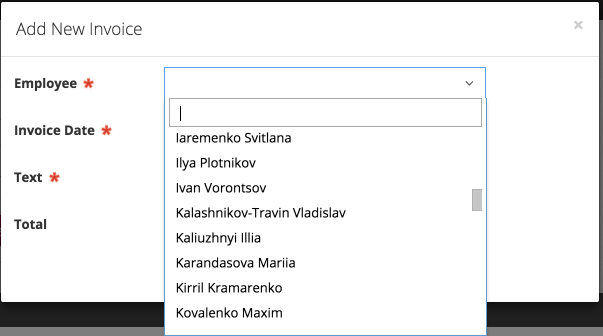
autocomplete="true" - will display a select2 field with fast search, convenient for large lists.
Datetime Field
<field type="datetime"
       name="date_order"
       caption="Order Date"
       width="20%"
       sorting="true" />
Attributes:
default- the default date format.format- the date format, see datetime format.length- deprecated, use format.html5- if set totrue, a standardhtml5calendar will be displayed.time- if set totrueandhtml5="true", a standardhtml5calendar with time will be displayed.
The format display does not work with the html5 attribute, so it is recommended to use a framework calendar to display correct formats.
When specifying a format with hours/minutes/seconds, it allows selecting them in the calendar.
The default attribute must be specified in the correct format that the database and strtotime can process.
When using externalValues, the date of this attribute will be stored in the database! Also, you need to write the correct format,
otherwise an Exception will be thrown about the incorrect format.
If it is expected that the field can be empty (nullable), it is necessary to specify inull="true" for correct operation.
Wysiwyg Field
<field type="wysiwyg"
       name="body"
       caption="Content"
       required="true"
       hide="true" />
File Field
<field type="file"
       name="file"
       caption="Images"
       thumb="120x80"
       fileName="wphid__ID__.jpg" />
Attributes:
uploadDirPath- the path where the file will be uploaded. It is used only when the field is used to upload an image.httpPath- the path that will be used to display the file to the user (relative).fileName- file name template. You can use the following aliases:link- custom link to the file. If specified, thehttpPathattribute will be ignored, and the file name will not be added,allowedMimeTypes- allowed MIME types for upload, separated by commas.
Aliases are available for substitution in attributes from the string via %field_name%, as well as __EXT__ and __NAME__ from the database. Session and global values are available via S%session_key% and G%global_key% - see Scope Values In Row Templates.
Only for images:
thumb- the size of the image thumbnail (a copy of the specified size will be created in[uploadDirPath]/thumbs/).resize- the maximum size of the image (the uploaded image will be converted to the specified values if it exceeds them).
Multi File Field
<field type="multiFile"
       name="file"
       uploadDirPath="/http/myProject/storage/test/"
       httpPath="/storage/test/"
       caption="Files"
       fileName="__INDEX__test__ID__.zip" />
Attributes:
uploadDirPath- the path where the file will be uploaded.httpPath- the path that will be used to display the file to the user (relative).fileName- file name template. You can use the following aliases:link- custom link to the file. If specified, thehttpPathattribute will be ignored, and the file name will not be added.
Use aliases to build the file name to avoid overwriting files with the same name.
Image Field
Fully inherits from file, but limits the upload to images only.
Many2many Field
<field type="many2many"
       caption="Relation"
       linkTable="infomessages_to"
       linkField="message_id"
       linkForeignField="group_id"
       foreignTable="groups"
       foreignKeyField="id"
       foreignValueField="group_name" />
<field type="many2many"
caption="<?php echo __('Permissions')?>"
linkTable="festi_sections_user_permission"
linkField="id_user"
linkForeignField="id_section"
foreignTable="company_sections"
foreignKeyField="id_section"
foreignValueField="caption"
hide="true">
<option id="1"><?php echo __('View')?></option>
<option id="2"><?php echo __('Edit')?></option>
</field>By default, the field is displayed as
checkbox. To display values as a select2 list, you can use themultiple="true"attribute.
Attributes:
foreignTable- the name of the table to which the foreign key refers.foreignKeyField- the name of the column in theforeignTableto which the foreign key refers.foreignValueField- the name of the column in theforeignTablewhose value will be used for display and search.linkTable- the name of the linking table.linkField- the name of the column in thelinkTableto which the foreign key of the current table refers.linkForeignField- the name of the column in thelinkTableto which the foreign key of theforeignTablereferscondition- additional conditions for field values, applied to display values in the DGS list (Store::ACTION_LIST).joinValues- additional joins, applied to display values in the DGS list (Store::ACTION_LIST).unique- set totruewhen only unique values should be displayed in the list and filter for the field.autocomplete- logic for dynamically loading values, see the description of theautocompleteattribute.valuesOrderBy- sorting for valuesajaxFormFields- list of fields whose data will be added to the array that will be sent when sending ajax to autocomplete, separate by comma,
If there are many values in foreignTable, you should use autocomplete to avoid slowing down the form loading:
<field type="many2many"
       caption="<?php echo __l('Companies'); ?>"
       linkTable="users2companies"
       linkField="id_user"
       linkForeignField="id_company"
       foreignTable="school"
       foreignKeyField="id"
       foreignValueField="name"
       autocomplete="true"
       autocompleteLimit="10"
       ajaxFormFields="id_site_content,id_author"
       width="10%" />
If a composite name for the value is needed:
<field  type="many2many"
        caption="<?php echo __('Settings')?>"
        linkTable="site_contents2settings"
        linkField="id_site_content"
        linkForeignField="id_setting"
        foreignTable="settings"
        foreignKeyField="id"
        filter="text"
        foreignValueField="CONCAT(settings.caption, ' | ', settings.id)">
    <option id="1"><?php echo __('View')?></option>
    <option id="2"><?php echo __('Edit')?></option>
</field>
Textarea Field
Attributes:
maxChars- maximum text length in the field.
Select Field
<field type="select"
       filter="select"
       caption="Status"
       orting="true"
       name="status"
       width="15%">
    <option id="active"><?php echo __('Active')?></option>
    <option id="deleted"><?php echo __('Remove')?></option>
    <option id="hidden"><?php echo __('Hidden')?></option>
</field>
Composite Field
This field is used to display fields merged into one column in the list.
Displayed only in the list, not in the forms
Attributes:
separator- separator between values.format- used to describe the display as a simple template.
<field type="composite"
       caption="<?php echo __('Customer')?>"
       name="customer"
       width="10%"
       separator=" ">
    <option store="users">name</option>
    <option store="users">lastname</option>
</field>
<field type="composite"
caption="<?php echo __('Customer')?>"
name="customer"
format="%name% %lastname%<br/>%email%<br/>%phone%"
width="15%">
<option store="users">name</option>
<option store="users">lastname</option>
<option store="users">email</option>
<option store="users">phone</option>
</field>Handler Field
A field that is processed through a plugin.
<field type="handler"
       name="reward"
       caption="<?php echo __('Rewards')?>"
       autocompleteUrl="<?php echo $autocompleteUrl; ?>"
       isnull="true"
       method=""
       plugin=""
       width="15%" />
Attributes:
-
method- an optional attribute in which you can specify a prefix to the method name in the handler. If this attribute is not specified, the prefix will be:get[Prefix][FieldName]Field[ViewType]ViewType = ['EditInput', 'ColumnName', 'CellValue', 'Value']
-
plugin- the name of the plugin that will perform the processing.
In the plugin, you need to implement the following handler methods:
EditInput- method must return the HTML of the field for creation/editing forms (can be omitted if the field is not displayed in forms).ColumnName- method must return the name of the column in the table where the value will be placed.CellValue- method must return the content for displaying in the table cell duringStore::ACTION_LIST(can be omitted if the field is not displayed in the table).Value- method must return the value that will be stored in the database.
Example of creating a handler field:
<field type="handler"
       name="place"
       caption="<?php echo __('Location')?>"
       isnull="true"
       plugin="Expenses"
       hide="true" />
class ExpensesPlugin extends DisplayPlugin
{
public function getPlaceFieldEditInput(AbstractField &$field, $value)
{
$data = false;
$values = $field->getStore()->getActionInstance()->getValues();
if ($values) {
$data = $this->object->get($values['id']);
}
$this->field = $field;
$this->value = $value;
$this->data = $data;
return $this->fetch('field_location.phtml');
}
public function getPlaceFieldValue(AbstractField &$field, $value, $requests)
{
return $value;
}
public function getPlaceFieldColumnName(AbstractField &$field)
{
return $field->getName();
}
}Virtual Field
If you need to create a field in DGS that will not access the storage to get a value.
<field type="preview"
       caption="Info"
       width="40%" />
class previewFormField extends abstractFormField
{
public function displayValue(?string $value, array $row = null): ?string
{
return print_r($row, 1);
}
public function isVirtualField($section = false)
{
return true;
}
}Price Field
A field for working with monetary sums.
<field type="price"
       name="cost"
       caption="<?php echo __('Cost')?>"
       width="10%"
       sorting="yes" />
Attributes:
locale- a field indicating in which format to display the amount. By default,en_US.UTF-8. Possible values can be found in the description of the PHP function money-format.currency- USD, EUR, etc.sensitive- if it set true, values will be concealed by default in cells. In the column name we can click on icon like eye to see original values.
Number Field
For fields that require input of only numbers.
<field type="number"
       name="ordered"
       caption="<?php echo __('Count')?>"
       width="10%"
       sorting="yes" />
Sql Field
A field that allows adding nested queries. If you use this field, you probably have an incorrect data structure. We do not recommend using this field.
<field type="sql"
       name="ordered"
       query="(SELECT COUNT(*) FROM permits WHERE permits.permit_id = permit_contractors.permit_id)"
       caption="<?php echo __('Count'); ?>"
       width="10%"
       sorting="yes"
       filter="range" />
Attributes:
query- required attribute to insert a nested SQL query.
An alternative option is to use the
expressionattribute.
Checkbox Field
In DGS, a checkbox field is used to represent Boolean-like values. While MySQL does not have a native Boolean data type, you can manage checkbox values effectively using integer representation.
<field type="checkbox"
       name="is_active"
       isnull="true"
       caption="<?php echo __('Active')?>"
       width="10%"
       filter="select"
       sorting="yes" />
Attributes:
-
isnull- This attribute allows the checkbox to be stored asnullwhen unchecked. Without this attribute, an unchecked box defaults to0.Note: The
isnullattribute influences search logic. When set to true, it enables searches fornullvalues, allowing users to filter results based on whether a checkbox is unchecked or has an undefined state. -
isbool- This attribute allows the checkbox to be stored as1or0. inline- This attribute can be used to add text to the checkbox label, which is displayed to the right of the checkbox.
Dependent Fields (Related Fields)
Conditionally, fields can be divided into parents (values being tracked) and children (values dependent on parents):
<field type="foreignKey"
       name="school_id"
       foreignTable="school"
       foreignKeyField="id"
       foreignValueField="name"
       caption="<?php echo __l('School'); ?>"
       width="35%"
       autocomplete="true"
       autocompleteLimit="15"
       ajaxChild="studygroup_id" />
<field type="foreignKey"
name="studygroup_id"
foreignTable="school_studygroups"
foreignKeyField="id"
foreignValueField="name"
caption="<?php echo __l('Study Groups'); ?>"
width="25%"
ajaxParent="school_id"
ajaxParentColumn="school_id" />ajaxChild - the name of the child field.
Thus, when updating the parent, there will be an Ajax loading of values for the child, using the logic of ForeignKeyLoadAction.
ForeignKeyLoadAction answers with application/json. The results array
carries one entry per child field, and values is the option list for that
field, where key is the label shown to the user and value is the
identifier stored in the column:
{
"results": [
{
"fieldName": "studygroup_id",
"childValue": "42",
"values": [
{"key": "...", "value": ""},
{"key": "Group A", "value": "42"},
{"key": "Group B", "value": "43"}
]
}
]
}childValue is the value the child field currently holds, so the client can
re-select it, and is null when the request carries none. values is always
present: an empty array means the child select should simply be cleared, which
is what happens when the parent value is emptied.
For the child, specify ajaxParent - the name of the parent field. The ajaxParentColumn parameter is used to specify the name of the column by which the values will be filtered.
Analyzing the example above:
school_idis a column of the tableschool_studygroups, which references the tableschoolthrough a foreign key on the fieldid;- when the parent select is changed, its new value will be sent for Ajax filtering in the child table based on the field
school_studygroups.school_id; - the filtered data will be used as options in the select of the child field.
If the conditions are more complex, use valuesWhere:
<field type="foreignKey"
name="id_parent_param"
caption="Parameter"
width="35%"
foreignTable="parameters"
foreignKeyField="id"
foreignValueField="caption"
ajaxChild="id_parent_param_value" />
<field type="foreignKey"
name="id_parent_param_value"
caption="Parameter Value"
width="35%"
foreignTable="parameter_values"
foreignKeyField="id"
foreignValueField="caption"
ajaxParent="id_parent_param"
valuesWhere="id_param=G%id_parent_param%" />It is also possible to establish a relationship between multiple children and one parent,
so that when the parent changes, the data in the child selects will also change.
For this purpose, list the names of all children separated by | in the ajaxChild parameter.
The results array then holds one entry per child, in the same order the names
were listed.
Examples of such relationships are shown below:
<field type="foreignKey"
name="school_id"
foreignTable="school"
foreignKeyField="id"
foreignValueField="name"
caption="<?php echo __l('School'); ?>"
width="35%"
autocomplete="true"
autocompleteLimit="15"
ajaxChild="studygroup_id|classroom_id" />
<field type="foreignKey"
       name="studygroup_id"
       foreignTable="school_studygroups"
       foreignKeyField="id"
       foreignValueField="name"
       caption="<?php echo __l('Study Groups'); ?>"
       width="25%"
       ajaxParent="school_id"
       ajaxParentColumn="school_id" />
<field type="foreignKey"
name="classroom_id"
foreignTable="school_classrooms"
foreignKeyField="id"
foreignValueField="name"
caption="<?php echo __l('Study Сlass Rooms'); ?>"
width="25%"
ajaxParent="school_id"
ajaxParentColumn="school_id" />ajaxParent can also be used with a select field:
<field type="select"
       name="type"
       caption="<?php echo __('General Type'); ?>"
       required="true"
       filter="select"
       width="15%"
       ajaxChild="type_id" >
    <option id="question"><?php echo __('Question'); ?></option>
    <option id="info_block"><?php echo __('Info Block'); ?></option>
</field>

<field type="foreignKey"
       name="type_id"
       required="true"
       caption="<?php echo __('Type'); ?>"
       foreignTable="hydra_questionnaires_items_types"
       foreignKeyField="id"
       foreignValueField="caption"
       filter="text"
       width="15%"
       ajaxParent="type"
       ajaxParentColumn="type" />
General Attributes for All Fields
Default
Sets the default value for the field, can be used to set values in the record creation form.
Value Filter
This attribute works like filter_var. You can find the full list of values in the PHP Manual
valueFilter="FILTER_VALIDATE_EMAIL"Only List
If you need the field to be displayed only in the list but not in the forms, use the onlyList attribute.
onlyList="true"Allow Empty
Used to add an empty first option in select and foreignKey fields.
allowEmpty="true"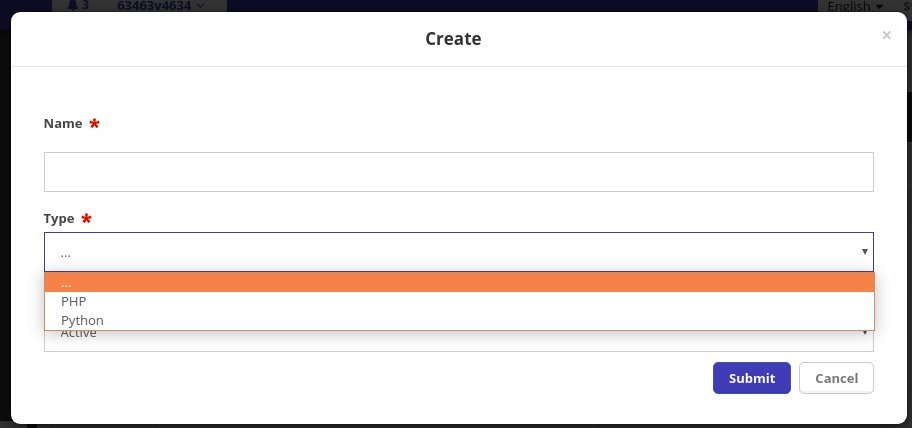
Isnull
Indicates whether to write an empty value or null to the database.
isnull="true"Hide
Hides the field from the list rows.
hide="true"Store
This attribute is used to specify the table in which the field is located.
Also, check the routers tag that describes the relationships between tables.
store="users"Clicable
This attribute makes the field a link that navigates to a child DGS.
clicable="true"relations.
<relations>
    <link type="parent"
          field="id_parent"
          foreignTable="categories"
          foreignField="id" />

    <link type="child"
          field="id"
          foreignTable="categories"
          foreignField="id_parent"
          cascade="true"
          treeCaption="caption" />
</relations>
Also, you need to add actions with types parent and child for navigation.
<actions>
    <action type="parent"
        caption="<?php echo __l('Parent Category'); ?>"
        relation="categories"
        relationType="parent" />
    <action type="child"
        caption="<?php echo __l('Child Category'); ?>"
        relation="categories"
        relationType="child" />
</actions>
Expression
This attribute is often used for calculations in columns.
If you use aggregate functions like SUM, AVG, etc., inside it,
don't forget to specify the groupBy attribute in the table tag.
<fields>
    <field type="text"
           name="Ordered"
           expression="(SUM(QuantityOrdered))"
           caption="<?php echo __('Ordered')?>"
           width="10%"
           sorting="yes" />

    <field type="datetime"
           name="issue_dates"
           expression="(SELECT issue_date FROM permits WHERE permits.permit_id = permit_contractors.permit_id GROUP BY permits.issue_date)"
           caption="<?php echo __('Issue Date')?>"
           width="15%"
           sorting="yes"
           filter="range"
           format="%m/%d/%Y" />

</fields>
You can also use the alternative way of describing in name:
<field type="textarea"
       name="SUM(amount) as sum_column"
       caption="<?php echo __('Sum')?>"
       width="40%"
       filter="text"
       isnull="true" />
Trim
If there is a column in the data list that contains very long text and you need to display only part of it,
for example, 150 characters, use the trim attribute.
Allowed values:
int- string length.button- display a button instead of text.
trim="150"Trim Mode
A related parameter with trim, which determines what to do with the truncated part.
Currently, only the popup value is supported. Popup displays a link [+],
clicking on which opens a dialog with the full text.
trimMode="popup"Validate Value
If you need to implement custom data validation for the field, you can use this attribute. The value should be written in the format:
[PLUGIN_NAME]::[PLUGIN_METHOD]onValidateValue = "Geo::onValidateZipFieldValue"class GeoPlugin
{
public function onValidateZipFieldValue(AbstractField &$field, $value)
{
if ($field->get('required') && empty($value)) {
$msg = __('%s is required field', $field->get('caption'));
$field->setErrorMessage($msg);
return false;
}
return true;
}
}Cell View Handler
When you need to override the value display in cells in the table,
you can use the cellViewHandler attribute with the value customView or using the Store::CELL_VIEW_HANDLER_CUSTOM constant.
Also, add two additional attributes plugin and method, indicating where the view decorator is located.
The specified method will be called with the parameters:
$field- field.$value- value.$row- all row values.
<field type="text"
       name="website"
       caption="<?php echo __('Website');?>"
       width="15%"
       filter="text"
       cellViewHandler="<?php echo Store::CELL_VIEW_HANDLER_CUSTOM; ?>"
       plugin="Companies"
       method="getCellView"
       disclaimer="<?php  echo __('Format: www.dealersite.com');?>"
       sectionIdent="contact"
       sectionCaption="<?php echo __('Contact'); ?>" />
class CompaniesPlugin
{
    public function getCellView(AbstractField $field, $value, $row)
    {
        $this->value = $value;

        return $this->fetch('cell_site.phtml');
    } // end getCellView
}
<a href="http://<?php echo $value; ?>" target="_blank"><?php echo $value; ?></a>Values Where
Attribute for many2many and foreignKey fields, used to add conditions for filtering values.
You can also use variables passed to the Store, for example:
valuesWhere="company_rebates.id_company = C%id_company%"The annotations supported in the where attributes are:
- G - Global
G%id_param% - S - SESSION
S%id_param% - C - Condition (Search DGS)
C%id_param%
Example of how to obtain the Primary Key Value from the parent table and filter data in the field:
<field type="foreignKey"
       name="id_page"
       caption="<?php echo __l('On Page')?>"
       foreignTable="site_pages"
       foreignKeyField="id"
       foreignValueField="caption"
       valuesWhere="id_site = <?php echo $this->store->getParentValue() ?>"
       width="20%"
       allowEmpty="true"
       isnull="true"
       required="true"/>
Scope Values In Row Templates
S%key% and G%key% are not limited to valuesWhere. They are also resolved in the attributes rendered from a row: action link, js and html, field autocomplete, composite format, and the file attributes httpPath, link and uploadDirPath.
<field type="image"
       name="logo"
       caption="<?php echo __l('Logo'); ?>"
       uploadDirPath="<?php echo FS_RESOURCES_ROOT; ?>storage/S%id_company%/"
       link="/files/S%id_company%/%id%/"/>
<action type="plugin"
caption="<?php echo __l('Orders'); ?>"
link="/company/S%id_company%/order/%id%/"/>S reads $_SESSION and G reads the globals - the same two scopes valuesWhere reads. C (Search DGS) is not available here, because a row template is rendered outside the search context.
The grammar is stricter than the one valuesWhere accepts, so a working valuesWhere expression does not always carry over. A scope letter must be uppercase and a key may contain only letters, digits and underscores: s%id_company% and S%user.name% resolve in a valuesWhere condition but stay literal in a row template. The reason is the sinks - a row template also carries HTML, JS and URLs, and a looser pattern reads the s% in ordinary prose such as <span>Gas%level%</span> as a session lookup.
A key that is missing from its scope, or that holds an array or an object, keeps its placeholder unchanged - exactly like an unknown %column%.
Scope values are substituted after the %column% values, and the list of placeholders is taken from the template before any column is filled. A value typed into the grid therefore cannot introduce a scope lookup that the template does not already carry.
It is not a guarantee that a grid value is never resolved. Substitution rewrites the whole string, so a placeholder the template does carry is replaced wherever it occurs - including inside text a row supplied a moment earlier. Given link="/user/%name%/S%id_company%/", a row whose name is the literal S%id_company% renders the company id in both positions. No value becomes reachable that the template was not already rendering.
The value is inserted verbatim, with no escaping.
For the markup sinks - action link, js and html, field autocomplete, composite format - escape it in the template for the context it lands in. The attribute is PHP-evaluated, so the surrounding text is yours to wrap.
For the path sinks - uploadDirPath, httpPath and the storage URI - that is not possible. The placeholder is resolved inside fillString, after the attribute's PHP has already run, so there is no point at which the author can wrap the resolved value: <?php echo escape('S%id_company%'); ?> escapes the placeholder text, not the session value. The value becomes a path segment as-is. Put only scope keys the application guarantees to be numeric or slug-shaped into a path attribute - never one a user can steer, since a value containing / or .. traverses.
Filter
Displays a filter above the column in the list, allowing you to search by column. Possible values:
text- searches for matches in text(LIKE %TERM%).select- displays a select with unique values for the field (DISTINCT).range- searches within a range (applied to numbers and dates).checkbox- searches by flag or presence of a record in the field.datetime- searches for an exact date match.multiple- displays a select with unique values for the field (DISTINCT), allowing you to select multiple options.exact- exact text match for the field.

filter="text"Mask
Input mask for the field, for more details on the format, see here
mask="'mask': '(999) 999-9999'"Regexp
Regular expression for value validation, enter without modifiers.
regexp="^[0-9\(\)\/\+ \-]*$"Is Custom
Indicates a custom field, it will be ignored in queries to the storage.
isCustom = "true"Format
This attribute controls the external formatting of values in the list, forms, and filters.
Usually used for custom fields (sql, handler, etc.), possible values: price, percent, number, and datetime format
- for
number, an additionaldecimalsparameter can be used:<field type="number" name="log_hours" expression="(log_seconds / 60 / 60)" caption="<?php echo __('Log Time')?>" width="10%" onlyList="true" format="number" decimals="2" sorting="yes" />
For some fields, this attribute is overridden, for example, for
datetime
Crypt
If true, the values will be encrypted in the database using an SSL certificate.
- Generating SSL public and private keys:
openssl genrsa  -out PrivateKey.pem 2048
openssl pkcs8 -topk8 -inform pem -in PrivateKey.pem -outform pem -nocrypt -out PrivateKey2.pem
openssl rsa -pubout -in PrivateKey2.pem -out PublicKey.pem- Pass parameters for the keys to
Core:
$options = [
    'plugins_folder' => 'plugins',
    'http_base'      => $GLOBALS['config']['http_base'],
    "convert_path"   => "/usr/bin/convert",
    'storeExceptionMode' => true,
    Core::OPTION_SSL_PUBLIC_KEY => $GLOBALS['config']['paths']['public_key'],
    Core::OPTION_SSL_PRIVATE_KEY => $GLOBALS['config']['paths']['private_key']
];

$core = Core::getInstance($options);
<field type="price"
caption="<?php echo __('Offer'); ?>"
name="offer"
required="true"
crypt="true"
width="20%" />Values are encrypted with RSA using the OAEP padding scheme
(OPENSSL_PKCS1_OAEP_PADDING). Note that OAEP limits the plaintext size
to the key size minus 42 bytes (e.g. 214 bytes for a 2048-bit key).
Overriding encryption from project code
Projects can replace or extend the framework encryption logic in two ways:
- Event listeners on the store (
StoreFieldCryptoEvent::EVENT_ON_ENCRYPT_VALUEandStoreFieldCryptoEvent::EVENT_ON_DECRYPT_VALUE):
use core\store\event\StoreFieldCryptoEvent;

$store->addEventListener(
    StoreFieldCryptoEvent::EVENT_ON_ENCRYPT_VALUE,
    function (StoreFieldCryptoEvent &$event): bool {
        $event->setResultValue(
            MyVault::encrypt($event->getValue())
        );

        return true;
    }
);- Implementing the listener interfaces on a class-approach store
(
core\store\event\IFieldEncryptValueListenerandcore\store\event\IFieldDecryptValueListener):
use core\store\event\IFieldDecryptValueListener;
use core\store\event\StoreFieldCryptoEvent;

class OffersStore extends Store implements IFieldDecryptValueListener
{
    public function onFieldDecryptValueHandler(
        StoreFieldCryptoEvent &$event
    ): void
    {
        $event->setResultValue(
            MyVault::decrypt($event->getValue())
        );
    } // end onFieldDecryptValueHandler
}
If a listener sets the result value, the framework openssl logic is skipped.
Migrating data encrypted before OAEP
Framework versions prior to the OAEP change encrypted values with the
insecure PKCS#1 v1.5 padding. Such values throw a FieldException when
read after the upgrade. To migrate:
- Register a temporary decrypt listener that falls back to the legacy padding:
use core\store\event\StoreFieldCryptoEvent;

$store->addEventListener(
    StoreFieldCryptoEvent::EVENT_ON_DECRYPT_VALUE,
    function (StoreFieldCryptoEvent &$event) use ($privateKey): bool {
        $decryptedValue = null;
        $res = openssl_private_decrypt(
            base64_decode($event->getValue()),
            $decryptedValue,
            $privateKey,
            OPENSSL_PKCS1_PADDING
        );

        if ($res !== false) {
            $event->setResultValue($decryptedValue);
        }

        return true;
    }
);
The listener only handles legacy values: decryption of OAEP values
with OPENSSL_PKCS1_PADDING fails, so the framework logic still
applies to already migrated rows.
-
Run a one-off migration that reads every encrypted row (decrypted via the fallback) and saves it back — the write path re-encrypts with OAEP.
-
Remove the listener so that only OAEP values are accepted.
Autocomplete
Ajax loading of values for the field, works for all fields. For text, unique values will simply be loaded.
autocomplete="true" - will use the logic of ForeignKeyLoadAction
autocomplete="<?php echo Core::getInstance()->getUrl('/autocomplete/school/');?>"
When using your link to retrieve values, the response should be in the following format:
{
results: [
        {
            key: "Caption 1",
            value: 2
        },
        {
            key: "Caption 2",
            value: 21
        }
    ]
}
The built-in ForeignKeyLoadAction answers in exactly this shape, with the
header Content-type: application/json. results is a flat list of key and
value pairs - key is the label shown in the field, value the identifier
stored in the column - unlike the dependent field branch described above, which
nests one entry per child field. The action sets the response type itself,
because no view stands between it and the request.
Additional attributes:
autocompleteMinLength- the minimum number of characters to send a request to retrieve values.autocompleteLimit- the maximum number of values to return in response to an autocomplete request.
Element Name
The element name is the name a field goes by in the rendered UI and in
the requests that come back from it - the input name, the css class
suffix, the filter key, the list row key, the CSV column, and the
fieldName parameter of an autocomplete request.
A field that declares a name is addressed by that name. A field that
declares none is addressed by its position in the schema, written __
followed by the index. Only a many2many may omit its name, so this
second form belongs to that field type alone.
IStoreField::getElementName() returns a Festi\Store\Field\ElementName
that owns the encoding in both directions:
$elementName = $field->getElementName();

$elementName->getValue();     // '__1' or 'settings'
$elementName->isNameless();   // true when it carries a position
$elementName->getModelKey();  // 1, or 'settings' - the model's own key

// Reading one back out of a request or a stored row:
$elementName = ElementName::fromRequest($_REQUEST['fieldName']);

$field = $store->getModel()->getFieldByElementName($elementName);
Only __ followed by digits to the end of the value is a position, so a
field genuinely named __ctx is addressed by that name and is never
read as position 0.
ElementName is Stringable, so echoing it, concatenating it,
interpolating it, and passing it to sprintf, implode or preg_match
all yield the name. Using it as an array key, comparing it with ===
against a string, or handing it to json_encode or http_build_query
does not - call getValue() at those sites.
Do not confuse the element name with getKeyInRequest(), which is the
key a field's value is posted under. They coincide for most fields,
but a many2many posts its values under m2m_<linkTable>.
Container Css
CSS class names for adding to DGS lists.
<field type="foreignKey"
       name="id_author"
       width="15%"
       required="true"
       foreignTable="users"
       foreignKeyField="id"
       foreignValueField="full_name"
       caption="<?php echo __('Author'); ?>"
       autocomplete="true"
       containerCss="hidden-sm hidden-xs"
       filter="text" />
Convenient to use for hiding columns when viewing on mobile.
Disclaimer
A disclaimer for the field, usually displayed below the field.
Where
Additional conditions for filtering data:
Events
StoreFieldEvent::EVENT_ON_GET_EDIT_VIEW
Event in which you can override the field value or its display:
use core\dgs\event\StoreFieldEvent;
use core\dgs\field\IStoreField;

// ...

$fields = &$store->getModel()->getFields();

unset($fields['amount']);

$fields['test_task_url']->set(IStoreField::OPTION_ONLY_LIST, false);
$fields['test_task_url']->set(IStoreField::OPTION_READONLY, true);

$fields['test_task_url']->addEventListener(StoreFieldEvent::EVENT_ON_GET_EDIT_VIEW, function (StoreFieldEvent &$event) {
    $this->taskUrl = $event->getValue();
    $content = $this->fetch('test_task_field.phtml');
    $event->setContent($content);
});