Data Grid Store (DGS)
One of the most commonly used components in the system is DGS. It is used to describe display lists and editing forms for various data.
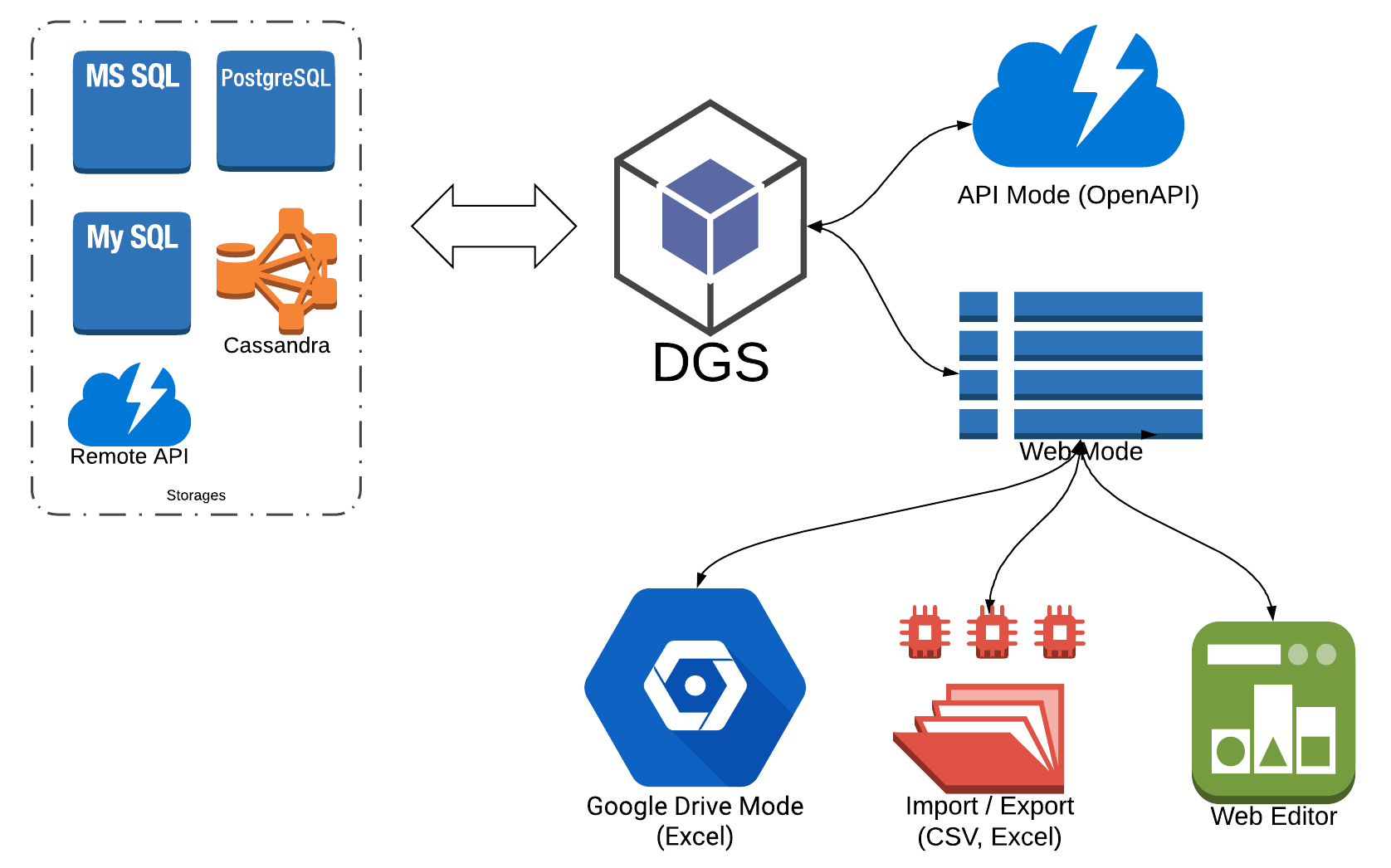
- Table
- Fields
- Field Grouping
- Actions
- Filters and Search
- Events
- Aggregators
- WEB Mode
- API Mode
- Dynamic Changes in DGS
- DGS with Multiple Tables
- DGS Class Approach
- DGS Class Schema
DGS Options
When creating a DGS, many options are used, which are passed as an array in the third parameter:
$options = [
    ...
];
$store = new Store($connection, $ident, $options);
Option model - Store::OPTION_MODEL
The data model in the context of DGS is the schema declaration that describes the structure of the store: its main table, fields, actions, relations, filters, listeners, etc. The framework supports four ways to declare a model — pick the one that best fits the use case.
| Source | When to use |
|---|---|
| XML (default) | Simple CRUD pages, conventional layout next to the plugin. |
| Array | Schemas generated at runtime from configuration data or external input. |
PHP class (ClassSchema) |
IDE navigation, static analysis, dynamic configuration via if, reuse via inheritance/traits. |
Custom StoreModel subclass |
Advanced loaders that don't fit any of the above. |
Resolution priority for the model option (handled by StoreModelResolver, first match wins):
modelis anIStoreModelSchemainstance →ClassStoreModelwith that instance.modelis anarray→ArrayStoreModel.modelis a string that names anIStoreModelSchemasubclass →ClassStoreModel(the class is instantiated with theStoreinjected). If the named class exists but does not implementIStoreModelSchema, the resolver raisesInvalidStoreSchemaException— silent fall-through to XML would mask the real misconfiguration.modelis not supplied and theStoresubclass implementsIStoreSchemaProvider→ClassStoreModelusing theIStoreModelSchemainstance returned fromgetSchema().- Otherwise →
XmlStoreModelloadstblDefs/{store}.xml; if the XML file is missing, loading fails withNot found model file.
flowchart TD
    Start([createStoreInstance]) --> HasModel{model option<br/>supplied?}

    HasModel -->|"IStoreModelSchema<br/>instance"| Wrap[ClassStoreModel<br/>wrapping instance]
    HasModel -->|array| ArrayModel[ArrayStoreModel]
    HasModel -->|string| IsSchema{names an<br/>IStoreModelSchema<br/>subclass?}
    HasModel -->|"not supplied"| Provider{Store implements<br/>IStoreSchemaProvider?}

    IsSchema -->|yes| ClassFromName[ClassStoreModel<br/>store injected]
    IsSchema -->|"class exists,<br/>wrong interface"| Raise[/InvalidStoreSchemaException/]

    Provider -->|yes| ClassFromProvider[ClassStoreModel<br/>from getSchema instance]
    Provider -->|no| Xml{"tblDefs/{store}.xml<br/>exists?"}

    Xml -->|yes| XmlModel[XmlStoreModel]
    Xml -->|no| NotFound[/Not found model file/]
ClassSchema is the standard base class that satisfies IStoreModelSchema — virtually every class-based schema extends it. Implement IStoreModelSchema directly only when you need a custom assembly path and are prepared to construct the schema yourself before passing it through the model option.
1. XML
Default. Place tblDefs/{store}.xml next to the plugin and the framework picks it up automatically:
$store = $this->createStoreInstance('products');
// schema loaded from plugins/Products/tblDefs/products.xml
The full XML reference and examples follow further down on this page.
2. Array
Pass an associative array as the model option. Same shape as the XML form, just spelled in PHP:
$params = [
    Store::OPTION_MODEL => [
        'table'  => ['name' => 'settings', 'primaryKey' => 'id'],
        'fields' => [
            ['type' => 'readonly', 'name' => 'id', 'caption' => 'ID'],
            ['type' => 'text',     'name' => 'caption', 'caption' => 'Caption'],
        ],
        'actions' => [
            Store::ACTION_LIST => ['type' => Store::ACTION_LIST, 'caption' => 'List'],
            Store::ACTION_EDIT => ['type' => Store::ACTION_EDIT, 'caption' => 'Edit'],
        ],
    ],
]
$store = $this->createStoreInstance('settings', $params);
See the full reference in Table → Describing the Model Using an Array.
3. PHP class (ClassSchema)
Declare the schema as a class that extends ClassSchema and configures the store via fluent builders:
namespace Plugins\SchoolUsers\Store;

use Festi\Store\Schema\ClassSchema;
use Festi\Store\Schema\Builder\ITableBuilder;
use Festi\Store\Schema\Builder\IFieldsBuilder;
use Festi\Store\Schema\Builder\IActionsBuilder;
use Store;

class UsersSchema extends ClassSchema
{
    protected function table(ITableBuilder $table): ITableBuilder
    {
        return $table->name('users')->primaryKey('id')->rowsForPage(50);
    }

    protected function fields(IFieldsBuilder $fields): IFieldsBuilder
    {
        $fields->add('id')
            ->type(ReadonlyField::class)
            ->caption(__('ID'));
        $fields->add('email')
            ->type(TextField::class)
            ->caption(__('Email'))
            ->required();

        return $fields;
    }

    protected function actions(IActionsBuilder $actions): IActionsBuilder
    {
        $actions->add(Store::ACTION_LIST)->caption(__('Users'));
        $actions->add(Store::ACTION_EDIT)->caption(__('Edit'));

        return $actions;
    }
}
For the three forms of wiring the schema into createStoreInstance (schema-class shorthand, explicit by class name, explicit by instance) see DGS Class Schema → Quick Start.
Custom Store subclasses can also declare their schema on the class itself by implementing IStoreSchemaProvider — StoreModelResolver picks it up automatically when no explicit model option is supplied.
See the full reference, the section-method contract, and the XML↔Array↔Class mapping table in DGS Class Schema.
4. Custom StoreModel subclass
For advanced loaders that can't be expressed with any of the above, inherit from StoreModel and implement load(). The model option doesn't accept arbitrary StoreModel FQNs (the resolver throws InvalidStoreSchemaException for class names that don't implement IStoreModelSchema) — instantiate the custom model yourself and inject it through your own Store subclass, or expose it via IStoreSchemaProvider if it can be expressed as an IStoreModelSchema.
Option store_view - Store::OPTION_VIEW_MODEL
The display model for DGS describes how to render the UI. You can pass an instance of the StoreView class.
Option theme_template_path - Store::OPTION_THEME_TEMPLATE_PATH
The path to the templates for the theme depends on the type of display model. By default, the path from Core (Core::OPTION_THEME_TEMPLATE_PATH) is taken.
Declaration of the Store in XML Format
To display a list or editing forms for data, you can use several options for data description: XML, Database, or Array. This section describes the XML format; all others are compatible with it.
Example of description:
<?xml version="1.0" encoding="UTF-8" ?>
<table charset="UTF-8"
       name="products"
       primaryKey="id"
       defaultOrderField="id"
       defaultOrderDirection="ASC"
       rowsForPage="20"
       grideditor="true">

    <relations>
        <link type="child"
              field="id"
              foreignTable="prices"
              foreignField="id_company"
              treeCaption="caption" />

        <link type="child"
              field="id"
              foreignTable="categories"
              foreignField="id_company"
              treeCaption="caption" />

    </relations>

    <fields>
        <field  type="readonly"
                caption="ID"
                sorting="true"
                name="id"
                trim="60"
                width="10%"
                filter="text" />

        <field  type="text"
                clicable="true"
                name="caption"
                caption="<?php echo __('Caption')?>"
                width="30%"
                filter="text"
                sorting="yes"
                required="true" />

        <field  type="select"
                caption="<?php echo __('Status')?>"
                sorting="true"
                name="status"
                filter="select"
                width="10%"
                required="true">
            <option id="active"><?php echo __('Active')?></option>
            <option id="deleted"><?php echo __('Deleted')?></option>
        </field>

        <field type="file"
               name="logo"
               hide="true"
               caption="<?php echo __('Logo')?>"
               fileName="__ID__.__EXT__"
               thumb="120x80"
               isnull="true"
               uploadDirPath="<?php echo Core::getInstance()->config['paths']['logo']; ?>"
               httpPath="<?php echo Core::getInstance()->config['http_paths']['logo']; ?>" />

        <field  type="text"
                name="phone"
                caption="<?php echo __('Phone')?>"
                width="20%"
                required="true"
                disclaimer="<?php  echo __('Format: (555) 787-4567');?>"
                regexp="#^\([0-9]{3}\)\s[0-9]{3}-[0-9]{4}$#" />

        <field  type="text"
                name="state"
                caption="<?php echo __('State')?>"
                width="10%"
                filter="text"
                required="true" />

        <field  type="text"
                name="website"
                caption="<?php echo __('Website');?>"
                width="15%"
                filter="text"
                regexp="#^[a-z\.]+$#" />

        <field  type="checkbox"
                name="is_paying"
                caption="<?php echo __('Is Paying')?>"
                isnull="true"
                filter="yes"
                width="5%" />

        <field  type="many2many"
                caption="<?php echo __('Managers')?>"
                linkTable="managers2products"
                linkField="id_company"
                linkForeignField="id_manager"
                foreignTable="users"
                foreignKeyField="id"
                foreignValueField="name"
                hide="true" />
    </fields>

    <filters>
        <filter field="id_user"><?php echo Core::getInstance()->user->getID(); ?></filter>
    </filters>

    <externalValues>
        <value field="mdate"><?php echo date('Y-m-d'); ?></value>
    </externalValues>

    <actions>

        <action type="prices"
                caption="<?php echo __('Prices')?>"
                relation="prices"
                relationType="child"
                mode="new" />

        <action type="categories"
                caption="<?php echo __('Categories')?>"
                relation="categories"
                relationType="child"
                mode="new" />

        <action type="insert"
                mode="new"
                caption="<?php echo __('Add')?>"
                title="<?php  echo __('Add New'); ?>" />

        <action type="list"
                caption="<?php echo __('Products')?>" />

        <action type="edit"
                mode="new"
                caption="<?php echo __('Edit')?>"
                title="<?php echo __('Edit: %caption%'); ?>" />

        <action type="remove"
                caption="<?php echo __('Remove')?>" />
    </actions>

</table>
Displaying the Store
- The simplest option to display the store is to use the system URL:
/festi/[XML_NAME]/[PLUGIN_NAME]//festi/products/
PLUGIN_NAME must be specified if the XML is in a plugin; in the example, this is the plugin Products.
-
Call the display from the plugin method:
class ProductsPlugin extends DisplayPlugin
{
    public function onDisplayList(Response &$response)
    {
        $store = $this->createStoreInstance("products");
        $store->onRequest($response);

        return true;
    }
}
The XML file should be located at: plugins/Products/tblDefs/products.xml.
-
If you are using multiple databases and want to display data from another database:
$store = $this->createStoreInstanceByConnection($db, "products");
The XML file should be located at: plugins/Products/tblDefs/products.xml.
-
Through the core:
$store = Core::getInstance()->createStoreInstanceByConnection(...);
$store = Core::getInstance()->createStoreInstance(...);
Note that through the core, XML will be searched not in the plugin but in the root of the project in the tblDefs folder.
If you need to search for XML in the plugin, pass the plugin name in the parameter array with the key plugin:
```php
$params = [
    'plugin' => 'Products'
];

$store = Core::getInstance()->createStoreInstance("products", $params);
```
Displaying the Editing Form
Sometimes you need to display only specific forms in the stores; here’s an example of how to select and process only the edit form:
$store = $this->createStoreInstance("invoices");
$action = $store->createActionInstance(Store::ACTION_EDIT);

$search = [
    'id' => $data['id']
];

$action->loadRow($search);

$action->onStart($response);

echo $response->getContent();
If you only need to display the form without processing the update request, use fetchForm instead of onStart:
echo $action->fetchForm();Tag relations
Often, it is necessary to establish a connection between different XML files and merge them based on a composite key.
This is done using the relations and action tags.
Let's consider an example: suppose we have a list of companies (companies.xml), and each company has sub-sections of email templates (company_email_templates.xml).
It is necessary to make a transition from companies to company_email_templates:
companies.xml:
<?xml version="1.0" encoding="UTF-8" ?>
<table charset="UTF-8"
       name="companies"
       primaryKey="id"
       defaultOrderField="id"
       defaultOrderDirection="ASC"
       rowsForPage="20"
       grideditor="true">

    <relations>

        <link type="child"
              field="id"
              foreignTable="company_email_templates"
              foreignField="id_company"
              treeCaption="caption" />

    </relations>

    <fields>
        <field  type="readonly"
                caption="<?php echo __('ID'); ?>"
                sorting="true"
                name="id"
                trim="60"
                width="10%"
                filter="text" />

        <field  type="text"
                name="caption"
                caption="<?php echo __('Name'); ?>"
                width="30%"
                filter="text"
                sorting="yes"
                required="true" />
    </fields>

    <actions>

        <action type="email_templates"
                caption="<?php echo __('Email Templates'); ?>"
                relation="company_email_templates"
                relationType="child"
                mode="new" />

        <action type="insert"
                mode="new"
                caption="<?php echo __('Add')?>"
                title="<?php  echo __('Add New Company'); ?>" />

        <action type="list"
                caption="<?php echo __('Companies'); ?>" />

        <action type="edit"
                mode="new"
                caption="<?php echo __('Edit')?>"
                title="<?php echo __('Edit: %caption%'); ?>" />

        <action type="remove"
                caption="<?php echo __('Remove')?>" />
    </actions>
</table>
We have described a child dependency in relations and added an action of any random type, but it is important not to use reserved types such as insert, list, etc.,
and specified relation attributes that must match with relations foreignTable:
relation="company_email_templates"
relationType="child"
Now, for it to work correctly, it is necessary to specify the parent relation in company_email_templates.xml:
<?xml version="1.0" encoding="UTF-8" ?>
<table charset="UTF-8"
       name="company_email_templates"
       primaryKey="id"
       defaultOrderField="id"
       defaultOrderDirection="ASC"
       rowsForPage="50">

    <relations>
        <link type="parent"
              field="id_company"
              foreignTable="companies"
              foreignField="id"
              treeCaption="caption" />
    </relations>

    <fields>
        <field  type="text"
                name="caption"
                caption="<?php echo __('Caption')?>"
                width="30%"
                filter="text"
                required="true"
                sorting="false" />

        <field  type="text"
                name="subject"
                caption="<?php echo __('Subject')?>"
                filter="text"
                width="30%"
                required="true"
                sorting="false" />

        <field  type="textarea"
                name="body"
                caption="<?php echo __('Body')?>"
                width="10%"
                required="true"
                hide="true" />
    </fields>

    <actions>
        <action type="insert"
                caption="<?php echo __('Add')?>"
                title="<?php echo __('Email Template'); ?>"
                mode="new" />

        <action type="parent"
                caption="<?php echo __('Companies')?>"
                relation="companies"
                relationType="parent" />

        <action type="list"
                caption="<?php echo __('Email Templates')?>" />

        <action type="edit"
                caption="<?php echo __('Edit')?>" />

        <action type="remove"
                caption="<?php echo __('Remove')?>" />
    </actions>

</table>
It is important that in action you must specify the type as parent.
If non-system URLs are used (
/festi/), then you need to specify theurlattribute in the relation:<link type="child" field="ident" foreignTable="module_options" foreignField="module" url="<?php echo Core::getInstance()->getUrl('/manage/modules/options/');?>" treeCaption="caption" /> <link type="parent" field="module" foreignTable="modules" url="<?php echo Core::getInstance()->getUrl('/manage/modules/');?>" foreignField="ident" treeCaption="caption" />
Tag externalValues
Through externalValues, you can add values for columns in the store that are known in advance and should not be entered by the user.
<externalValues>
    <value field="mdate"><?php echo date('Y-m-d'); ?></value>
</externalValues>
Tag routers
To describe the relationship between tables, you need to use the routers tag.
<field type="text"
       caption="<?php echo __('Owner Email')?>"
       sorting="true"
       name="id_user"
       store="users"
       expression="email"
       filter="text"
       width="25%"
       readonly="true" />
<routers>
<route store="advertisements"
joinStore="users"
type="INNER"
on="advertisements.id_user = users.id" />
</routers>Tag route
Describes the rule for joining tables.
joinStoreName- the real name of the table; if this attribute is specified, thenjoinStorewill be used as an alias.
Tag highlights
It is often necessary to highlight or change something in the rows of the data list.
For this, you can use highlights, which adds the specified CSS class to a row that matches the values specified in the rule tag.
It is important to note that for foreignKey fields, if you want to set conditions on values rather than names, you need to add the _foreign_ prefix.
<highlights>
    <rule cssClass="m-row-green">
        <field name="_foreign_action">replay</field>
    </rule>

    <rule cssClass="m-row-yellow">
        <field name="action">Sent to Customer</field>
    </rule>

    <rule cssClass="CUSTOM_CSS_CLASS_NAME">
        <field name="action">Sent to Customer</field>
        <field name="status">active</field>
    </rule>
</highlights>
If you need to specify a rule for the value of a column that is not displayed, in the action Store::ACTION_INSERT, you need to set the attribute isLoadAllColumns="true".
Annotations
/**
 * @store festi_plugins
 * @event Store::EVENT_PREPARE_ACTION_REQUEST
 */
public function onUploadPlugin(FestiEvent &$event)
{
    ...
}

/**
 * @store festi_plugins | OTHERE_STORE
 * @event Store::EVENT_BEFORE_INSERT | Store::EVENT_BEFORE_UPDATE
 */
public function onInstallPlugin(FestiEvent &$event)
{
    ...
}
Examples
Removing an Action from the Store
public function onDisplayList(Response &$response)
{
    $store = $this->createStoreInstance("invoices");

    $store->getModel()->removeAction(Store::ACTION_EDIT);

    $store->onRequest($response);

    return true;
}
Retrieving Data from One Table by Multiple Fields
This task often occurs with a user table; for example, in the system, there are two types of users, buyers and managers.
We need to store both the buyer and the manager in one table and display both in the list.
For this, we need to join the user table twice.
In the routers, the joinStoreName attribute should specify the actual name of the table, while the joinStore should be your chosen alias.
<?xml version="1.0" encoding="UTF-8" ?>
<table charset="UTF-8"
name="deals"
primaryKey="id"
defaultOrderField="mdate"
defaultOrderDirection="DESC"
rowsForPage="50"
plugin="Deals">
<search>
<filter field="deals.status">new</filter>
</search>
<routers>
<route store="deals"
joinStore="advertisements"
type="INNER"
on="advertisements.id = deals.id_ad" />
<route store="deals"
joinStore="users"
type="INNER"
on="users.id = deals.id_user" />
<route store="deals"
joinStore="company_users"
joinStoreName="users"
type="LEFT"
on="company_users.id = deals.id_company_user" />
</routers>
<fields>
<field type="text"
caption="<?php echo __('Deal ID'); ?>"
name="id"
width="7%"
required="true"
filter="text"
clicable="true"
sorting="true" />
<field type="composite"
caption="<?php echo __('Customer')?>"
name="customer"
width="10%">
<option store="users">name</option>
<option store="users">lastname</option>
</field>
<field type="composite"
caption="<?php echo __('Contact Info')?>"
name="customer_info"
separator="<br/>"
width="10%">
<option store="users">email</option>
<option store="users">phone</option>
</field>
<field type="datetime"
caption="<?php echo __('Last Updated'); ?>"
name="mdate"
width="10%"
sorting="true" />
<field type="datetime"
caption="<?php echo __('Expiration'); ?>"
name="expire_date"
width="10%"
sorting="true" />
<field type="foreignKey"
name="action"
caption="<?php echo __('Status'); ?>"
width="15%"
foreignTable="deal_actions"
foreignKeyField="ident"
foreignValueField="caption"
filter="select"
isnull="true" />
<field type="composite"
caption="<?php echo __('Manager')?>"
name="company_user"
width="10%">
<option store="company_users">name</option>
<option store="company_users">lastname</option>
</field>
</fields>
<actions>
<action type="list"
caption="<?php echo __('Deals'); ?>" />
</actions>
</table>Retrieving Parent ID in Tables with Nested Inheritance
<?xml version="1.0" encoding="UTF-8" ?>
<table name="site_contents"
       charset="UTF-8"
       primaryKey="id"
       defaultOrderField="id"
       defaultOrderDirection="ASC"
       rowsForPage="200">

    <relations>
        <link type="parent"
              field="id_parent"
              foreignTable="site_contents"
              url="<?php echo '/site/'.$idSite.'/manager/'; ?>"
              foreignField="id" />

        <link type="child"
              field="id"
              url="<?php echo '/site/'.$idSite.'/manager/'; ?>"
              foreignTable="site_contents"
              foreignField="id_parent"
              cascade="true"
              treeCaption="name" />
    </relations>

    <filters>
        <filter field="status"><?php echo ContentValuesObject::STATUS_ACTIVE; ?></filter>
    </filters>

    <externalValues>
        <value field="id_site"><?php echo $idSite; ?></value>
    </externalValues>

    <fields>
        <field type="readonly"
               caption="<?php echo __l('ID'); ?>"
               name="id"
               width="5%"
               required="true"
               sorting="true"/>

        <field type="text"
               clicable="true"
               caption="<?php echo __l('Page Title'); ?>"
               name="title"
               width="30%" />

        <field type="text"
               clicable="true"
               caption="<?php echo __l('Name'); ?>"
               name="name"
               width="30%"
               required="true" />

        <field type="select"
               caption="<?php echo __('Type');?>"
               sorting="true"
               name="type"
               filter="select"
               readonly="true"
               width="10%"
               required="true">
            <option id="file"><?php echo __('File'); ?></option>
            <option id="directory"><?php echo __('Directory'); ?></option>
            <option id="image"><?php echo __('Image'); ?></option>
            <option id="page"><?php echo __('Page'); ?></option>
            <option id="module"><?php echo __('Module'); ?></option>
        </field>
        <field type="text"
               caption="<?php echo __l('Path'); ?>"
               name="path"
               hide="true"
               readonly="true"
               required="true" />

        <field type="checkbox"
               clicable="true"
               caption="<?php echo __l('Is Menu Item?'); ?>"
               name="is_menu_item"
               width="20%"
               filter="select"
               isnull="true"
               sorting="true" />

        <field type="text"
               caption="<?php echo __l('Meta Title'); ?>"
               name="meta_title"
               hide="true"
               isnull="true" />

        <field type="text"
               caption="<?php echo __l('Meta Keywords'); ?>"
               name="meta_keywords"
               hide="true"
               isnull="true" />

        <field type="textarea"
               caption="<?php echo __l('Meta Description'); ?>"
               name="meta_description"
               hide="true"
               maxChars="180"
               isnull="true" />

    </fields>

    <filters>
        <filter field="id_site"><?php echo $idSite; ?></filter>
    </filters>

    <listeners>
        <listener event="<?php echo Store::EVENT_BEFORE_INSERT; ?>"
                  plugin="Sites"
                  method="onCreateNewCategory" />
        <listener event="<?php echo Store::EVENT_BEFORE_UPDATE; ?>"
                  plugin="Sites"
                  method="onUpdateContent" />

        <listener event="<?php echo Store::EVENT_REMOVE; ?>"
                  plugin="Sites"
                  method="onDeleteContent" />
        <listener event="<?php echo Store::EVENT_ON_LIST_ACTIONS; ?>"
                  plugin="Sites"
                  method="onPrepareContentActions" />
    </listeners>

    <actions>
        <action type="parent"
                caption="<?php echo __l('Parent'); ?>"
                relation="site_contents"
                relationType="parent" />

        <action type="child"
                caption="<?php echo __l('Child Contents'); ?>"
                relation="site_contents"
                relationType="child" />

        <action type="upload"
                mode="new"
                caption="<?php echo __l('Upload'); ?>"
                view="top"
                link="<?php
                        $idParent = $this->store->getParentValue();
                        if ($idParent) {
                            echo Core::getInstance()->getUrl('/site/%s/manager/%s/upload/', $idSite, $idParent);
                        } else {
                            echo Core::getInstance()->getUrl('/site/%s/manager/upload/', $idSite);
                        }
                      ?>" />

        <action type="insert"
                caption="<?php echo __l('Create Directory'); ?>" />

        <action type="list"
                caption="<?php echo __l('Contents'); ?>" />

        <action type="edit"
                caption="<?php echo __l('Edit Item'); ?>" />
        <action type="remove"
                caption="<?php echo __l('Remove Item'); ?>" />
    </actions>

</table>
Manually Overriding the Error When Adding a New Record
<?xml version="1.0" encoding="UTF-8" ?>
<table charset="UTF-8"
       name="invoices"
       primaryKey="id"
       defaultOrderField="invoices.id"
       defaultOrderDirection="DESC"
       rowsForPage="50">

    <fields>
        <field type="readonly"
               name="id_rand_invoice"
               caption="<?php echo __('Invoice No')?>"
               width="20%"
               sorting="yes"
               readonly="true"
               link="<?php echo Core::getInstance()->getUrl('/invoice/%id%/'); ?>"
               isnull="true"
               filter="text" />

        <field type="readonly"
               name="rand_account_number"
               caption="<?php echo __('Account No')?>"
               width="20%"
               sorting="yes"
               regexp="#^[A-Za-z0-9]+$#Umis"
               filter="text"
               readonly="true"
               link="<?php echo Core::getInstance()->getUrl('/invoice/%id%/'); ?>"/>

        <field type="text"
               name="id_tobaccostock_order"
               caption="<?php echo __('Order No')?>"
               width="20%"
               sorting="yes"
               regexp="#^[A-Za-z0-9]+$#Umis"
               filter="text"
               required="true"
               link="<?php echo Core::getInstance()->getUrl('/invoice/%id%/'); ?>"/>

        <field type="select"
               caption="<?php echo __('Status')?>"
               sorting="true"
               name="status"
               onlyList="true"
               width="20%">
            <option id="new"><?php echo __('New')?></option>
            <option id="created"><?php echo __('Created')?></option>
        </field>

        <field type="foreignKey"
               name="id_user"
               caption="<?php echo __('Creator'); ?>"
               width="20%"
               foreignTable="users"
               foreignKeyField="id"
               foreignValueField="login"
               onlyList="true" />

    </fields>

    <externalValues>
        <value field="id_user"><?php echo Core::getInstance()->user->getID(); ?></value>
        <value field="status">new</value>
    </externalValues>

    <listeners>
        <listener event="<?php echo Store::EVENT_BEFORE_INSERT; ?>"
                  plugin="Invoice"
                  method="onBeforeCreateInvoice" />
    </listeners>


    <actions>

        <action type="list"
                caption="<?php echo __('Invoices')?>" />

        <action type="edit"
                caption="<?php echo __('Edit')?>"
                button="<?php echo __('Preview'); ?>"
                title="<?php echo __('Invoice Options'); ?>"
                cancelCaption="<?php echo __('Create Invoice'); ?>"
                cancelUrl="javascript:void(0)"
                mode="new" />

        <action type="remove"
                caption="<?php echo __('Remove'); ?>" />

        <action type="create"
                caption="<?php echo __('Create'); ?>"
                view="top"
                link="<?php echo Core::getInstance()->getUrl('/invoices/create/'); ?>"
                mode="new" />

    </actions>

</table>
/**
* @event Store::EVENT_BEFORE_INSERT
*/
public function onBeforeCreateInvoice(FestiEvent &$event)
{
$idOrder = $event->target['values']['id_tobaccostock_order'];
$search = [
'id_tobaccostock_order' => $idOrder
];
$invoiceValues = $this->object->get($search);
if ($invoiceValues) {
$event->target['isUpdated'] = true;
$event->target['lastErrorMessage'] = __(
'Invoice for Order No %s already exists.',
$idOrder
);
return false;
}
return true;
} // end onBeforeCreateInvoiceHow to Change the Link in Table Cells with Links?
<?xml version="1.0" encoding="UTF-8" ?>
<table name="site_contents"
       charset="UTF-8"
       primaryKey="id"
       defaultOrderField="id"
       defaultOrderDirection="ASC"
       rowsForPage="200">

    <relations>
        <link type="parent"
              field="id_parent"
              foreignTable="site_contents"
              url="<?php echo '/site/'.$idSite.'/manager/'; ?>"
              foreignField="id" />

        <link type="child"
              field="id"
              url="<?php echo '/site/'.$idSite.'/manager/'; ?>"
              foreignTable="site_contents"
              foreignField="id_parent"
              cascade="true"
              treeCaption="name" />
    </relations>

    <filters>
        <filter field="status"><?php echo ContentValuesObject::STATUS_ACTIVE; ?></filter>
    </filters>

    <externalValues>
        <value field="id_site"><?php echo $idSite; ?></value>
    </externalValues>

    <fields>
        <field type="readonly"
               caption="<?php echo __l('ID'); ?>"
               name="id"
               width="5%"
               required="true"
               sorting="true"/>

        <field type="text"
               clicable="true"
               caption="<?php echo __l('Page Title'); ?>"
               name="title"
               width="30%" />

        <field type="text"
               clicable="true"
               caption="<?php echo __l('Name'); ?>"
               name="name"
               width="30%"
               required="true" />

    </fields>

    <filters>
        <filter field="id_site"><?php echo $idSite; ?></filter>
    </filters>

    <listeners>

        <listener event="<?php echo Store::EVENT_ON_FETCH_LIST_CELL_VALUE_WITH_LINK; ?>"
                  plugin="Sites"
                  method="onPrepareListCellValueLink" />

    </listeners>

    <actions>
        <action type="parent"
                caption="<?php echo __l('Parent'); ?>"
                relation="site_contents"
                relationType="parent" />

        <action type="child"
                caption="<?php echo __l('Child Contents'); ?>"
                relation="site_contents"
                relationType="child" />

    </actions>

</table>
public function onPrepareListCellValueLink(FestiEvent &$event)
{
$values = &$event->getTargetValueByKey('row');
$allowedTypes = [
ContentValuesObject::TYPE_IMAGE,
ContentValuesObject::TYPE_PAGE
];
if (!in_array($values['type'], $allowedTypes)) {
return false;
}
$site = System::getCurrentSiteInfo();
$search = [
'site_contents.id' => $values['id'],
'id_site' => $site['id']
];
$contentValuesObject = $this->plugin->siteContents->loadRow($search);
$url = &$event->getTargetValueByKey('url');
$url = $contentValuesObject->getFullUrl();
$target = &$event->getTargetValueByKey('target');
$target = '_blank';
return true;
} // end onPrepareListCellValueLinkExample of Using DGS to Create a Form and Manually Process Data
/**
 * @urlRule ~^/companies/new/$~
 * @area admin
 */
public function onAjaxCreateForm(Response &$response)
{
    $store = $this->createStoreInstance("company_create");

    $method = [&$this, 'onCreateNewCompany'];
    $store->addEventListener(Store::EVENT_BEFORE_INSERT, $method);

    $action = $store->createActionInstance(Store::ACTION_INSERT);

    if (!$response->isFlush()) {
        $response->setAction(Response::ACTION_CONTENT);
    }

    $action->onStart($response);

    return true;
} // end onAjaxCreateForm

public function onCreateNewCompany(StoreActionEvent &$event)
{
    $event->setUpdated();

    $store = &$event->getActionInstance()->getStore();

    $actionName = $store->getAction();
    $action = &$store->getModel()->getActionByRef($actionName);

    $action['redirectUrl'] = $this->getUrl('/companies/');
} // end onCreateNewCompany
Example of a List Where Columns Obtained Not from the Database, but Filled from a Plugin Need to be Added
<?xml version="1.0" encoding="UTF-8" ?>
<table charset="UTF-8"
       name="cloud_services"
       primaryKey="id"
       defaultOrderField="id"
       defaultOrderDirection="ASC"
       rowsForPage="20"
       emptyMessage="<?php echo __('Not found Services...')?>">

    <fields>
        <field type="text"
               name="caption"
               caption="<?php echo __('Service'); ?>"
               width="30%" />

        <field type="text"
               caption="<?php echo __('Host'); ?>"
               name="host"
               width="30%"
               isCustom="true" />

        <field type="text"
               caption="<?php echo __('Status'); ?>"
               name="status"
               width="30%"
               isCustom="true" />
    </fields>

    <listeners>
        <listener event="<?php echo Store::EVENT_ON_LOAD_LIST_DATA; ?>"
                  plugin="FestiCloudServicesManager"
                  method="onLoadListData" />
    </listeners>

    <actions>
        <action type="list"
                caption="<?php echo __('Services'); ?>" />
        <action type="toggle"
                caption="<?php echo __l('Enable'); ?>"
                confirmDialog="true"
                dialogTitle="<?php echo __('Confirmation'); ?>"
                dialogMessage="<?php echo __('Are you sure?'); ?>"
                link="<?php echo Core::getInstance()->getUrl('/app/%s/services/%%id%%/toggle/', App::getID()); ?>" />

    </actions>

</table>
public function onLoadListData(FestiEvent &$event)
{
$tableData = &$event->getTargetValueByKey('data');
$info = &$event->getTargetValueByKey('info');
$indexes = &$info['indexes'];
$idApp = App::getID();
$statusIndex = $indexes['status'];
$hostIndex = $indexes['host'];
$services = $this->_loadServicesByAppID($idApp);
foreach ($tableData as &$row) {
$this->_prepareServiceRow(
$row,
$services,
$statusIndex,
$hostIndex
);
}
} // end onLoadListData
private function _prepareServiceRow(
&$row, $services, $statusIndex, $hostIndex
)
{
$idService = $row['id'];
$status = &$row['data'][$statusIndex]['value'];
$host = &$row['data'][$hostIndex]['value'];
if (empty($services[$idService])) {
$status = '—';
$host = '—';
} else {
$service = $services[$idService];
$status = $service['status'];
$host = $service['host'].":".$service['port'];
}
return true;
} // end _prepareServiceRowChanging Standard Notifications When Adding (Deleting) a Record
After successfully adding (deleting) a record, we see the standard message STATUS_SUCCESS. To change it, you can use the following code:
public function onDisplayInvites(Response &$response)
{
    $store = $this->createStoreInstance("user_invites");

    $msg = __('Your invitation has been sent successfully');

    if ($this->isRemoveRequest()) {
        $msg = __('Your invitation has been deleted successfully');
    }

    $store->setOption(Store::OPTION_MESSAGE_SUCCESS, $msg);

    $store->onRequest($response);
} // end onDisplayInvites
To disable messages, you should set the option Store::OPTION_MESSAGE_SUCCESS to null.
$store->setOption(Store::OPTION_MESSAGE_SUCCESS, null);